WordPress Adventures: Mysteries of Disappearing Text and Self-centering Posts
At Business and Blogging I’ve posted about some challenges I faced recently with upgrading WordPress sites.
The problem I mentioned there about not being able to type into the editing pane in the Write Post section of site, or being able to type in and then having the text disappear when I hit Save and Continue Editing, arose here too. Through trial and error I found that the problem arose on the Internet Explorer 7 browser, but not on Mozilla Firefox.
Having sorted that out, I felt I could get on with actually blogging, rather than fiddling, in my non-technical way, with the innards of the machine. ‘Twas not to be.
I now have the mystery of the text in all my posts being centered, not left justified. But it is happening in one browser – you guessed it, IE7 : in Mozilla Firefox it’s left justified as I intend it to be. I’m including the IE7 screenshot because I’m hoping the problem will be solved within the next 24 hours: I’ve emailed Ainslie Johnson who developed this WP-Andreas09 theme and in the past I’ve found her both prompt and helpful in replying. As the screenshot shows, the centering has also affected the links in the sidebars.
I tried another theme, in case this was a problem just with WP-Andreas09. But while that theme, the very elegant Tarski, got the justification sorted it would not display the info in the sidebars.
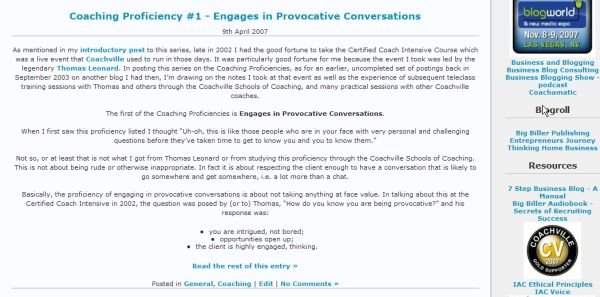
(Update – April 21: Ainslie Johnson did reply very promptly, as I had anticipated. She commented that I might have some faulty xhtml code and suggested I run a validation test. Well, the validation test did indicate a problem with the code but I couldn’t see that problem in the editing pane on WordPress. And with other themes the unwanted centering did not happen. Have reluctantly switched themes, as I don’t have the time/expertise to figure this out and fix it otherwise. I still think WP-Andreas09 is a great theme.)

Des Walsh
Business coach and digital entrepreneur. With coach training from Coachville.com and its Graduate School of Coaching, and a founding member of the International Association of Coaching, Des has been coaching business owners and entrepreneurs for the past 20 years. Over the same period he has also been actively engaged in promoting the business opportunities of the digital economy. He is a certified Neurolinguistic Programming (NLP) coach, and a certified specialist in social media strategy and affiliate marketing.

It seems you’ve put the myJournal etheral theme sometimes back. Do know that if you need any kind of help, be it further mods or tweaks to suit your needs, feel free to get in touch and I would be glad to help you 🙂
Hans
Thanks. I tried a whole stack of themes last night. Some that I like, including the myJournal ethereal theme, don’t seem to be as responsive as, say, Andreas09, on showing tabs for pages, especially if there are parent and child pages. I’ll take up your offer to be in touch.
Des
thanks for this suggestion Des. I’ll now know on what to work to make the theme better 🙂 You’re right, child pages don’t display well.
This glitch can happen because of using css body{text-align:center;} for centering content in IE;
Just add one more div wrapper right after opening body tag.
This will do the trick.
Haha, I was trying that with child pages. Those pages looked … grrr! lol
I don’t really know how to respond usefully to these latest comments. This post was written a year ago and refers to another theme.
@Business letter format: Thanks for your suggestion. I don’t really know what you mean by posting comments in the code and modifying afterwards. I don’t think I’ve ever said I don’t like WordPress. I do like WordPress and use it on several blog sites. I have tried Drupal and it was quite beyond my skills to make it work for me.
This is obviously too late to help, but for future reference i've found that each class for content needs to have a text-align:left css tag. I had the same problem, but this fixed it.
This is obviously too late to help, but for future reference i've found that each class for content needs to have a text-align:left css tag. I had the same problem, but this fixed it.